Value proposition canvas: a guide with example
How the value proposition canvas works: customer jobs, pains and gains, the value map, a filled-in example, a copyable template and how to test fit with real customers.

The value proposition canvas is a one-page tool for checking that what you build matches what a specific customer actually needs. It was created by Alexander Osterwalder and the team at Strategyzer as a zoom-in on the Business Model Canvas. For an indie maker or early founder, it is a fast way to turn customer interviews into product and marketing decisions before you spend months building.
This guide explains the two halves of the canvas, walks through a filled-in example and shows how to use it with real customer research.
In this article9
What the value proposition canvas is
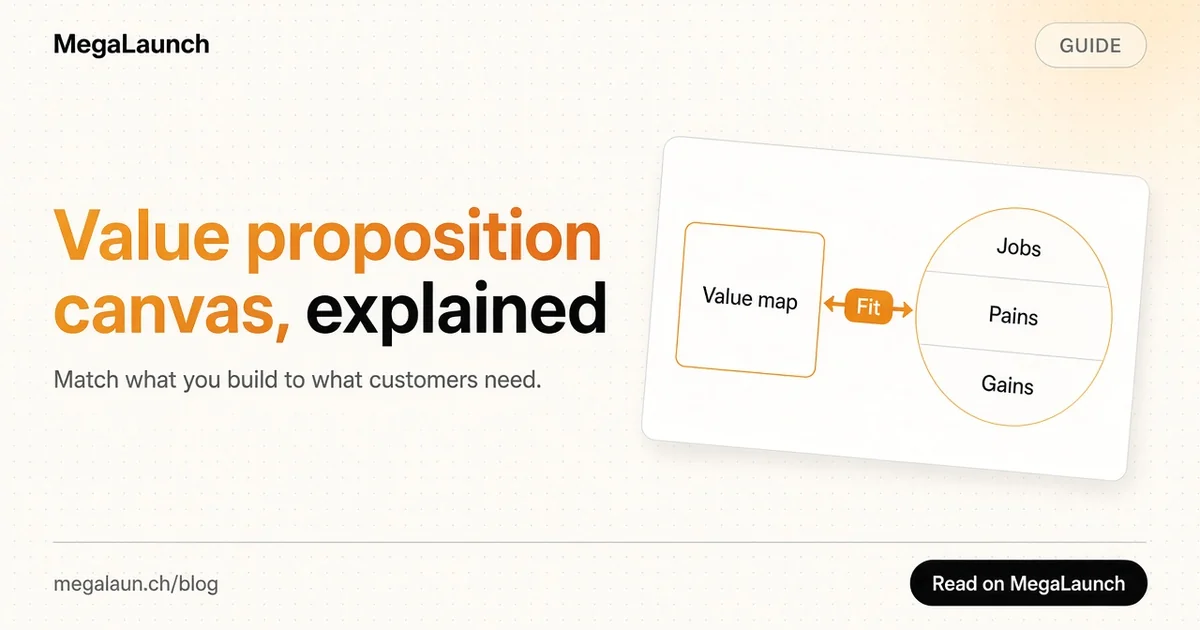
A value proposition is the reason a customer picks your product over the alternatives. The canvas breaks that reason into parts you can test. Strategyzer describes it in The Value Proposition Canvas as two connected shapes:
- a customer profile on the right, a circle that describes one customer segment
- a value map on the left, a square that describes what you offer that segment
You have a good value proposition when the square fits the circle, which Strategyzer calls fit.
It sits inside the larger Business Model Canvas, where it covers two of the nine blocks: customer segments and value propositions.
The customer profile: jobs, pains and gains
Fill in the circle first. It is about the customer, not your product.
Customer jobs are what the person is trying to get done. They can be functional (send invoices), social (look professional to clients) or emotional (stop worrying about cash flow). The idea comes from jobs-to-be-done theory; the Christensen Institute has a clear summary, and Clayton Christensen's Harvard Business Review article Know Your Customers' Jobs to Be Done shows why customers "hire" products for a job rather than buying features.
Pains are what annoys the customer before, during or after the job: risks, costs, wasted time, obstacles. Write them concretely. "Chasing late payments takes three hours a week" is better than "invoicing is hard".
Gains are the outcomes the customer wants, including ones they would be pleasantly surprised by. "Getting paid within a week" or "never writing a reminder email again".
Rank each list. The top two or three pains and gains matter more than the full list.
The value map: products, pain relievers and gain creators
Now fill in the square, item by item against the circle.
Products and services lists what you offer: the app, the features, any support or service around it.
Pain relievers describe exactly how your product removes the ranked pains. Each pain reliever should point to one pain on the right.
Gain creators describe how your product produces the ranked gains.
If a feature does not relieve a top pain or create a top gain, question whether it belongs in your first version.
A filled-in example
Here is a canvas for a hypothetical invoicing tool for freelance designers.
| Customer profile | |
|---|---|
| Jobs | Send invoices, get paid on time, look professional |
| Top pains | Late payments, awkward reminder emails, manual tax math |
| Top gains | Paid within 7 days, less admin, clear yearly totals |
| Value map | |
|---|---|
| Products | Web app, invoice templates, payment links |
| Pain relievers | Automatic polite reminders, card payment link on every invoice, tax calculated per country |
| Gain creators | Payment status dashboard, one-click yearly export |
Read it row by row: every top pain has a reliever, and every top gain has a creator. That is a first sign of fit. It is still a hypothesis until customers confirm it.
How to fill it in with real customers
A canvas filled in from your own head is a list of guesses. Use it to organize evidence instead:
- Pick one segment. One canvas per customer type. "Small businesses" is too broad; "freelance designers billing five to twenty clients a month" is usable.
- Interview five to ten people from that segment before you write anything in the circle. Ask about the last time they did the job, what went wrong and what they tried. Rob Fitzpatrick's The Mom Test explains how to ask questions that get honest answers instead of polite compliments.
- Write each pain and gain in their words, with a note of how many people mentioned it.
- Map your product only after the circle is filled and ranked.
- Test the fit with a landing page, a waitlist or a paid pilot. Our guide to idea validation covers cheap tests you can run in a week.
Update the canvas after each round of interviews. It is a working document, not a poster.
Turning the canvas into marketing copy
The canvas also writes your first landing page:
- your headline comes from the top gain
- your subheadline names the top pain and how you remove it
- your feature list comes from the pain relievers, written as outcomes
If you struggle to write a short line from the canvas, look at our tagline examples for patterns that work.
Common mistakes
- Starting with the value map. Founders love their features. Fill in the customer side first or you will just describe your product twice.
- Several segments on one canvas. Different customers have different pains. Use one canvas each.
- Vague entries. "Saves time" fits every product. Say how much time, on which task.
- Never testing it. The canvas is a list of hypotheses until real customers act on it by signing up or paying.
Value proposition canvas template
Copy this structure into a doc, a whiteboard or a spreadsheet:
- Segment:
- Jobs (functional, social, emotional):
- Pains, ranked:
- Gains, ranked:
- Products and services:
- Pain relievers (one per top pain):
- Gain creators (one per top gain):
- Evidence for each item (interview count, test result):
When your canvas holds up in interviews, the next step is to put the product in front of strangers. A launch on MegaLaunch is a quick way to see whether your value proposition makes sense to people who have never heard of you.
Frequently asked questions
What is the value proposition canvas?
It is a one-page tool created by Alexander Osterwalder and Strategyzer that compares a customer profile (jobs, pains and gains) with a value map (products, pain relievers and gain creators) to check whether a product fits what customers need.
What is the difference between the value proposition canvas and the Business Model Canvas?
The Business Model Canvas describes a whole business in nine blocks. The value proposition canvas zooms in on two of them, customer segments and value propositions, in more detail.
Which side of the value proposition canvas do you fill in first?
The customer profile. Start with the jobs, pains and gains of one segment, ideally from interviews, then fill in the value map to match them.
How do you know if you have product fit on the canvas?
When every top pain has a pain reliever and every top gain has a gain creator, you have a fit on paper. You confirm it only when real customers sign up, use the product or pay.
Sources
 @matthias_mrc
Put it into practice. Launch your product.
A permanent page, a followed link to your site, and makers who vote for what they like.
- Free with a link back to MegaLaunch
- Premium: $9.99 one-time, no backlink needed
Done for you
We submit your product to 100+ dofollow directories.
From one brief, with a report for every directory. No badge needed on your site.


From$99one-time
See the plans