Notion alternatives: 6 workspaces for indie makers compared
Notion alternatives for indie makers and SaaS teams: Obsidian, Coda, ClickUp, Anytype, AppFlowy and Linear compared by strength, offline use and open source, with a guide to choosing and mistakes to avoid.

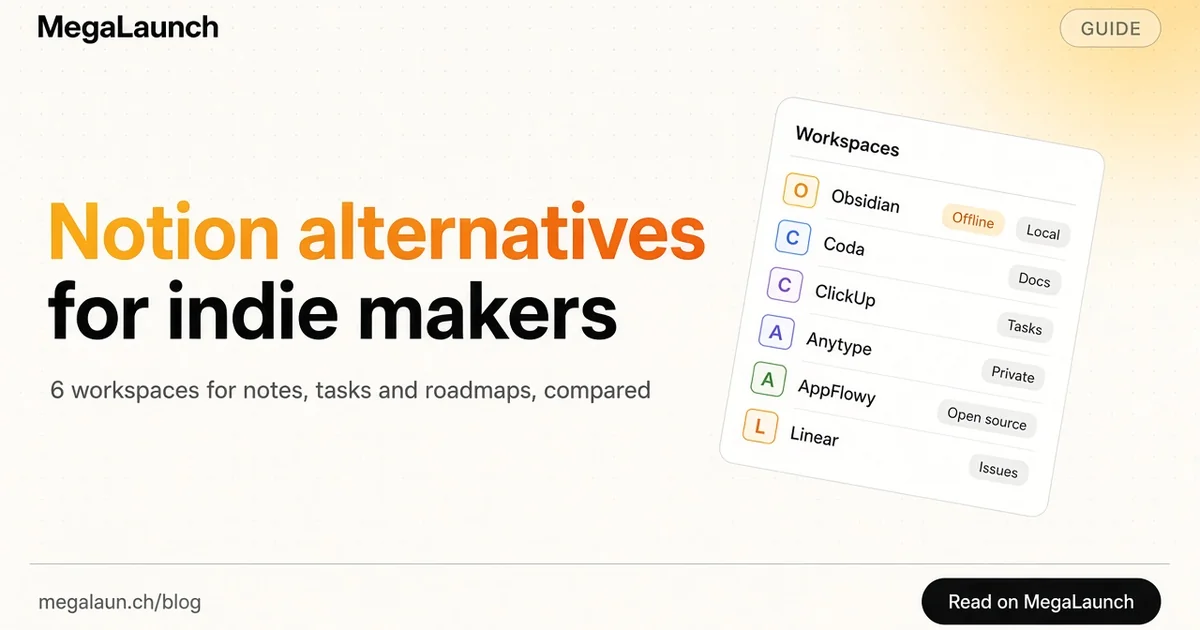
Notion is where many founders keep their launch plan, roadmap, meeting notes and half their company wiki. It is flexible, it looks good and the free plan goes a long way. But flexibility has a cost: pages get slow as databases grow, offline access is limited, and a blank page invites endless setup instead of shipping. If you are wondering whether another tool fits your workflow better, this guide compares the best Notion alternatives for indie makers and small SaaS teams, and tells you when switching is worth the effort.
In this article8
Why founders look for Notion alternatives
Most people do not leave Notion because it is bad. They leave because their needs changed:
- Speed. Large workspaces with many relations and rollups can feel sluggish, especially on mobile.
- Offline and ownership. Notion stores your data in the cloud. Some makers prefer local files they control, or end-to-end encryption.
- Too much freedom. A tool with no opinion means you design your own system. Some teams ship faster with a tool that already knows what a task, a sprint or a bug is.
- Self-hosting. Teams with strict data rules want an open source tool they can run on their own server.
- Cost as the team grows. Per-seat pricing adds up once contractors and teammates join. Check the current Notion pricing against your real headcount before deciding.
Write down which of these reasons applies to you. It decides which alternative makes sense.
The best Notion alternatives compared
1. Obsidian: local-first notes you own
Obsidian is a note-taking app that works on a folder of plain Markdown files on your own device. It is fast, works fully offline, and has a huge plugin ecosystem, including databases, kanban boards and graph views of how your notes connect. Because your notes are just files, you can back them up, version them with Git or open them in any editor.
Best for: solo founders who want a personal knowledge base, research notes and writing drafts. Less good for: real-time collaboration with a team.
2. Coda: docs that behave like apps
Coda is the closest in spirit to Notion. Pages mix text with powerful tables, formulas, buttons and integrations called Packs, so a single doc can become a CRM, an OKR tracker or a launch dashboard. Its formula language is closer to a spreadsheet than Notion's, which makes it strong for calculations.
Best for: teams that want docs and lightweight internal tools in one place.
3. ClickUp: project management first
ClickUp combines tasks, docs, whiteboards, goals and time tracking. Where Notion makes you build a task system from a database, ClickUp ships one ready to use, with statuses, assignees, dependencies and many views.
Best for: small teams running several projects at once who need real task management. Watch out for: the number of features, which can feel heavy for a solo maker.
4. Anytype: private and local-first
Anytype looks and feels like a Notion-style workspace with objects, types and relations, but data lives on your devices and syncs with end-to-end encryption. It works offline and you can share spaces with collaborators.
Best for: privacy-minded founders who like Notion's building blocks but want to keep data local.
5. AppFlowy: the open source option
AppFlowy is an open source workspace with documents, databases, kanban boards and AI features. You can use the hosted version or self-host it, which makes it a direct answer to the "we need to own our data" requirement.
Best for: technical teams that want a Notion-like tool on their own infrastructure.
6. Linear: when your workspace is really a product backlog
Many SaaS founders use Notion mainly as a bug tracker and roadmap. If that is you, Linear is worth a look. It is built for software teams, with issues, cycles, projects and roadmaps, keyboard shortcuts everywhere and integrations with GitHub and Slack. It is opinionated, which is the point: less setup, more shipping.
Best for: product teams that write code and want fast issue tracking.
Quick comparison
| Tool | Main strength | Works offline | Open source | Best fit |
|---|---|---|---|---|
| Obsidian | Local Markdown notes | Yes | No | Solo knowledge base |
| Coda | Docs with tables and formulas | Limited | No | Docs plus internal tools |
| ClickUp | Task and project management | Limited | No | Multi-project teams |
| Anytype | Encrypted, local-first workspace | Yes | Source available | Privacy-first makers |
| AppFlowy | Self-hostable workspace | Yes | Yes | Teams owning their data |
| Linear | Issue tracking and roadmaps | Limited | No | Software teams |
How to choose the right Notion alternative
- Start from the job, not the tool. List what you actually do in Notion today: notes, tasks, wiki, CRM, roadmap. Often one job causes the pain, and you only need to move that one.
- Decide where data must live. Cloud is easiest. Local files or self-hosting give control but you handle backups.
- Count collaborators. A solo founder and a team of eight need different tools. Real-time editing and permissions matter more as you grow.
- Test with a real project. Move one active project, for example your next product launch plan, and use the new tool for two weeks before migrating everything.
- Check the exit door. Make sure you can export to Markdown, CSV or HTML. You do not want to repeat this migration with no way out.
A setup that works for many indie makers
You do not need a single tool for everything. A common, low-maintenance stack looks like this:
- Linear or ClickUp for tasks and bugs.
- Obsidian or Anytype for private notes, ideas and drafts.
- One shared doc tool (Notion, Coda or AppFlowy) for the public roadmap, the wiki and your go-to-market strategy template.
If you share progress publicly, keep a simple changelog page in that shared tool and reuse it for your build in public updates.
Mistakes to avoid
- Migrating during launch week. Moving tools is a project. Do it in a quiet period, never right before a launch.
- Rebuilding every template on day one. Copy only what you use weekly. Old pages can stay archived in Notion.
- Ignoring import limits. Notion exports relations and databases in ways other tools read differently. Test one complex database first.
- Choosing on looks alone. A beautiful tool you do not open every day is worse than a plain one you do.
- Forgetting your team. If collaborators resist the new tool, information ends up scattered across both.
Summary
Notion is still a solid all-in-one workspace. Obsidian and Anytype suit makers who want local, private notes, Coda fits teams that need docs with app-like tables, ClickUp and Linear give you real project and issue tracking, and AppFlowy is the open source choice for self-hosting. Pick the tool that fixes your actual pain, test it on one live project, and keep your energy for shipping. When your product is ready, plan the release and submit it to MegaLaunch.
Frequently asked questions
What is the best alternative to Notion?
It depends on the job. Obsidian for private local notes, Coda for docs with powerful tables, ClickUp for project management, Linear for software issue tracking, Anytype for encrypted local-first workspaces and AppFlowy for an open source, self-hostable option.
Is there an open source Notion alternative?
Yes. AppFlowy is open source and can be self-hosted. Anytype publishes its source code and keeps data local with end-to-end encrypted sync.
Which Notion alternative works offline?
Obsidian works fully offline on local Markdown files, and Anytype and AppFlowy are also designed to work offline.
Should I move everything out of Notion at once?
No. Move the one use case that causes problems first, test the new tool on a live project for two weeks, and keep old pages archived in Notion.
Sources
 @matthias_mrc
Put it into practice. Launch your product.
A permanent page, a followed link to your site, and makers who vote for what they like.
- Free with a link back to MegaLaunch
- Premium: $14.99 one-time, no backlink needed
Done for you
We submit your product to 100+ dofollow directories.
From one brief, with a report for every directory. No badge needed on your site.


From$99one-time
See the plans